
Wordpress or Wix? That is the question.
- Jun 25, 2018
- 4 min read
Updated: Mar 4, 2023
You want to create a website and want to know which website builder to use for your particular needs. WordPress may seem like the most popular and widely used website builder in the world, but Wix is well on it's way in putting up a fight.

There are other website builders other than WordPress and Wix but most have not accomplished the ease of use and capabilities of Wix and WordPress. Till then, let's just compare the two popular website building platforms.
Cost
The cost of building a website factors into your marketing and advertising budget. The total costs of developing and maintaining your site will entirely depend on your needs. Wix offers modern templates at a very reasonable price. You have the option to do your hosting through Wix but carefully look at the options they provide here.
Wordpress on the other hand, has a basic plan with a WordPress hosting provider like hostgator.com that will cost you $2.75 per month and includes a free custom domain name. If your budget permits, then you can use a managed WordPress hosting provider like WPEngine which start at $35 per month. The cost of a WordPress site will increase if you decide to use their premium WordPress themes and/or plugins. However, there are thousands of free WordPress themes and plugins available that you can use to reduce costs.
The cost of building your site will depends on how much resources you plan to use for your website.
Ease of Use
Wix created a user-friendly website building platform made easy for beginners. You can position and size text and images with ease and easily edit a website in mobile view. There is also a simple menu of free items you can use with quick drag and drop features. With a little know-how, It can't get any easier. If you stumble in any area, there is plenty of step-by-step information that Wix provides.

If you have zero experience in creating websites, WordPress may be a little difficult to use even with it's visual editor features. You may have to familiarize yourself with different sections such as the navigation menus, customizer, and visual post editor. If you do not wish to spend the time to learn the basic WordPress platform, you might be better off working with a professional web developer such as ProjectDevs to save yourself the headache.
ProjectDevs offers free consultation so they can help you decide what your best options are based on your experience and budget. If you decide to design a super simple website on your own without plans to customizing it in the future, Wix is clearly the answer.
Design & Flexibility
Wix has more than 500 templates to choose from and it's own plugin tools that are easy accessible in the menu section. All Wix designs are fully responsive and written in HTML5. Using the built-in tools, you can further customize your site design, change the layout, and rearrange items as you see fit.
With forever evolving technology, Wordpress requires constant updates. Whether it be WordPress itself or the third party plugins installed into Wordpress. A good example would be like Apple's OS system that requires constant software and app updates. Failing to update WordPress or the plugins you currently use in your website can result to a major error or crash that you or your web developer will have to figure out if the third party support is not available in a timely manner.

The major benefit of WordPress is the full customization and flexibility of your website's appearance and having over 55,000 free plugins to choose from the wordpress.org plugin directory therefore WordPress wins in this category.
E-commerce
Wix offers e-commerce only with their paid plans. Users with the free plan cannot run their e-commerce store on Wix without upgrading to a paid plan. With the WixStores, you can only accept payments using PayPal or Authorize.net which accept most major credit cards.
There are a few other third-party merchant apps that you can use, but those apps can cost more with their monthly fees with most likely a limited gateways.
Wordpress makes it easy to create an online store using WooCommerce themes. It will take some research and studying if you are not familiar with the basic functions and methods of operating an online store.
SEO
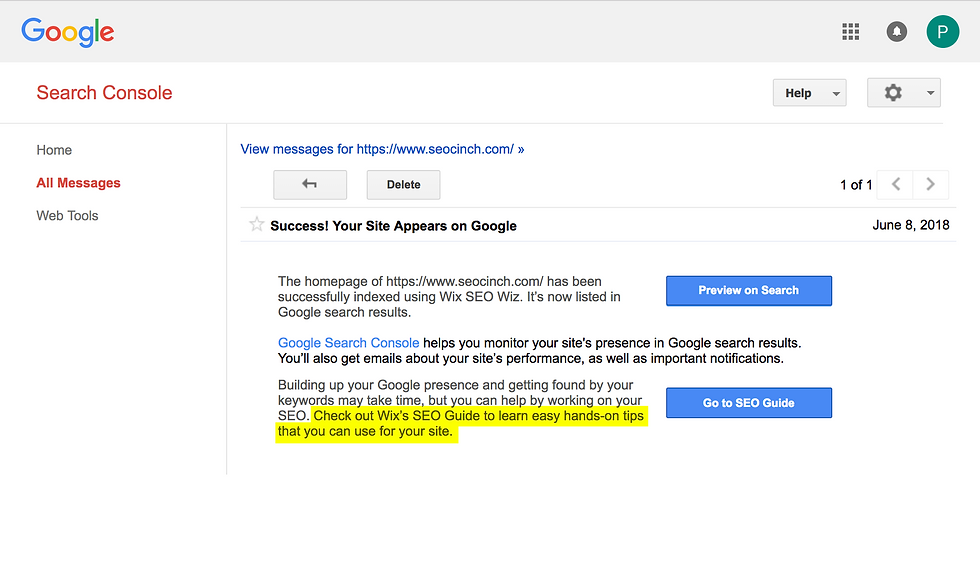
Wix has a simple built-in SEO checklist that walks you through the process of improving your SEO and also makes suggestions based on your website's pages. It's also a big plus when Google's Search Console suggest that you check out Wix's SEO guide to learn easy hands-on tips to improve your SEO for your website...wink, wink.
Wordpress has an easy to use Yoast third-party plugin for SEO. Both Wix and Yoast are easy to use but they also have a few minor suggestive differences. I suggest working with a professional SEO expert such as Cinch that can run a full extensive SEO audit to see if your website is at optimum level for top ranking status.
Our thoughts here...if Google suggest we check out Wix's SEO Guide, We'll lean towards Wix for SEO.
Conclusion
Wix has it's user-friendly WYSIWYG functions like an Apple computer and WordPress has it's weapons for Windows coders that love to fully control and customize their websites using HTML, JavaScripting or CSS.
Ultimately, we recommend WordPress for those who require a fully customized website, but that is not to say that Wix isn’t a viable option for getting simple websites up and running right away. We hope you have a better understanding of the two options after reading our review.
Below are some examples of fully customized award winning WordPress based websites.


Comments